Know which bills your next paycheck covers.
Type your paychecks and bills once. See what each check has to pay, what is left after, and whether you can afford the next thing on your list, before you buy it.
$14.99 launch price through December 31, 2026, then $19.99. Prices in USD. Google Sheets and Excel. Instant download. US and Canada customers only.
- Built by a Marine Corps veteran with Security+ certification
- Refund policy
- Secure checkout by Stripe
Not ready? Get the free one-month mini sheet
See a paycheck update
A silent loop of the Paycheck Planner with sample numbers. Take-home pay is entered on Settings, the Paycheck Plan shows what is left, a phone bill is added, and what is left on the second paycheck updates. The second paycheck includes a one-time column.
A look inside the sheets
Why the month looks fine and one week does not
Your monthly numbers look fine. You make enough. So why is there a week every month where you are watching the bank app and hoping nothing else comes out?
Because bills do not care about monthly totals. They care about dates. When rent, the car payment and insurance all land before your second paycheck, the first check comes up short, even in a month where you have money left over.
Most budgets show the month. The Paycheck Planner shows each paycheck.
What it does for you
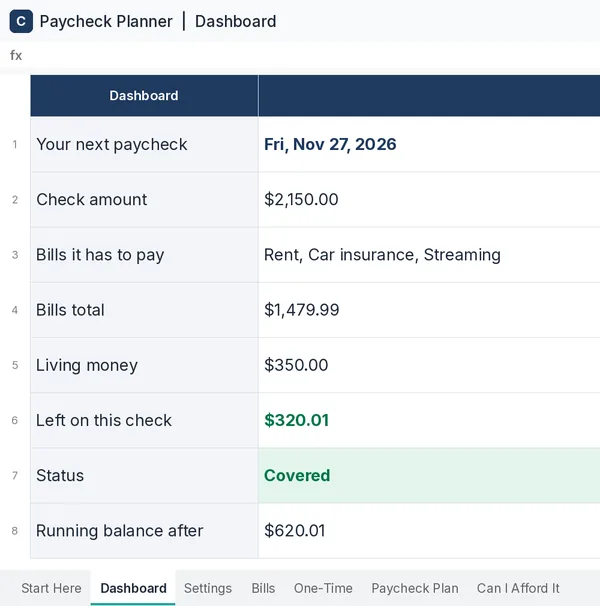
- See your next paycheck's job before it hits. The Dashboard names the bills it has to pay and the amount left after.
- Catch a short check weeks ahead. A red SHORT flag and a heads-up line tell you which check will not stretch, so you can move a due date or set money aside while there is still time.
- Ask "Can I afford it?" and get a straight answer. Type the price and the date. You get YES, YES using your cushion, NOT YET with the first paycheck where it fits without putting a later bill at risk, or NOT IN THIS PLAN.
- Stop doing paycheck math in your head. Every-2-weeks, weekly, twice-a-month and monthly pay are built in. Bills due on the 31st land correctly in short months.
- Plan the whole year in one place. 52 paychecks ahead, with a running balance after each one.
How it works (about 10 minutes)
- Enter your pay. Next payday, how often, and the usual amount. Type the real amount on any check that is different.
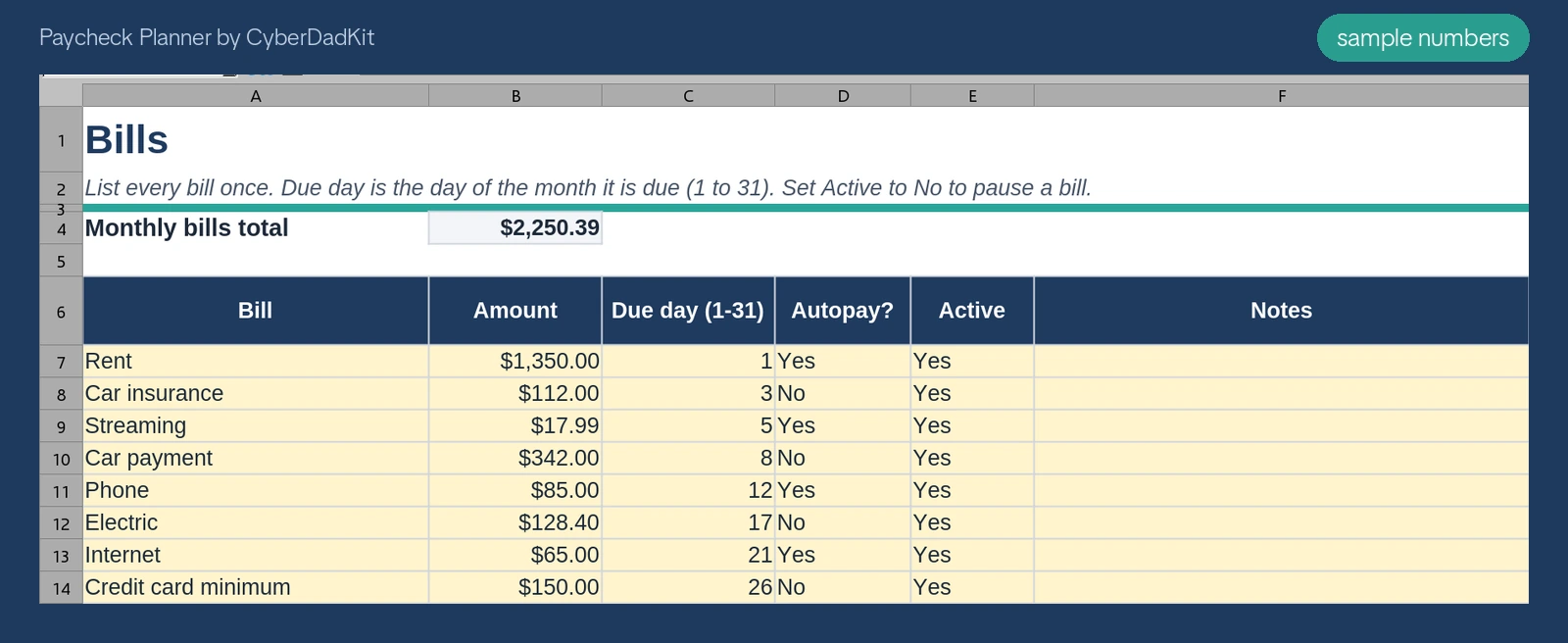
- List your bills. Name, amount and the day of the month it is due.
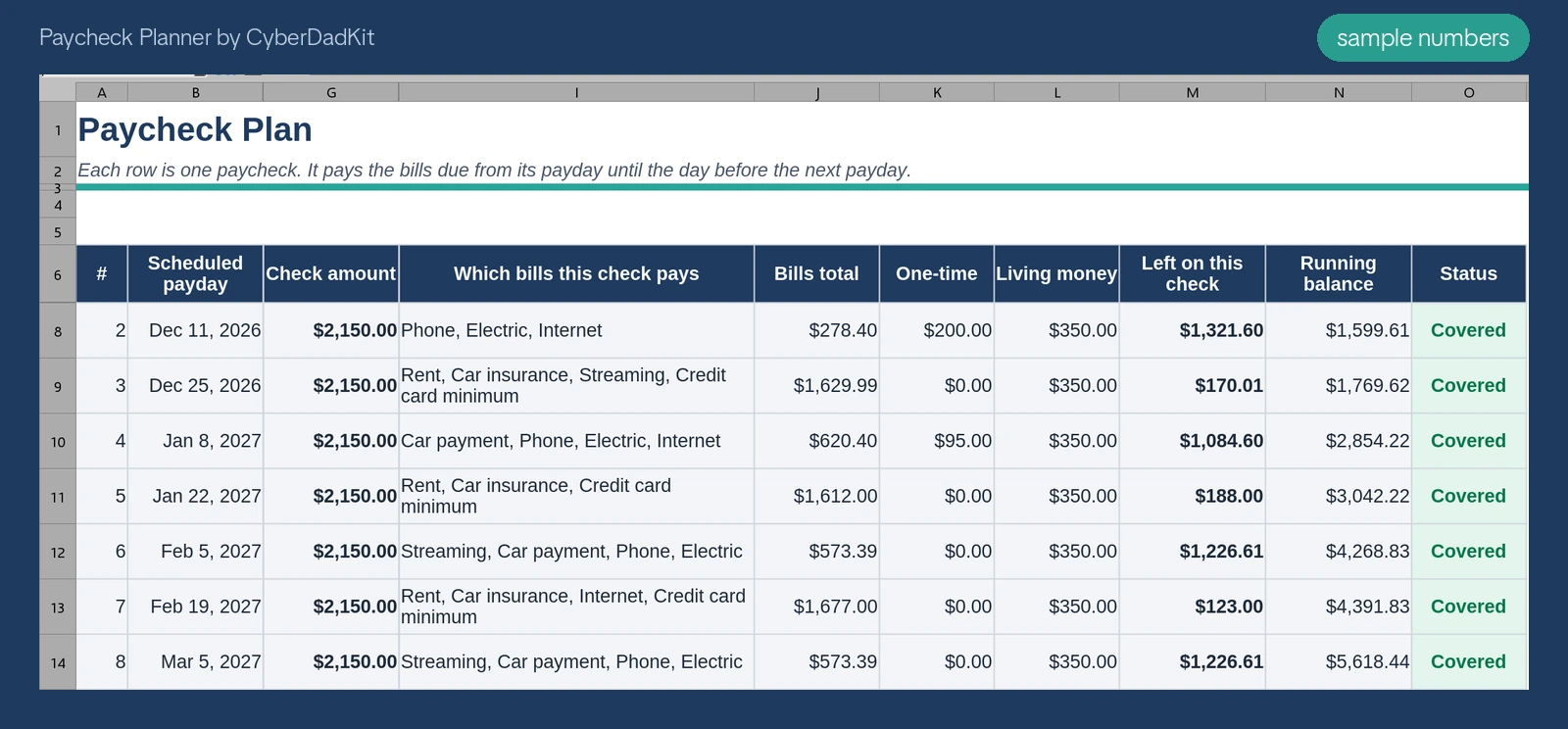
- Read your plan. Each paycheck shows the bills it covers, one-time costs, Living money, what is left, and a Covered or SHORT status.
Sample numbers are already filled in, so you can see how it works before you type anything.
What is inside
Paycheck Planner, $14.99 launch price through December 31, 2026, then $19.99
- Start Here guide with a color key (yellow = you type, grey = the sheet does the math)
- Dashboard: next paycheck, bills it pays, what is left, heads-up on the next short check, next 6 paychecks
- Settings: pay schedule, Living money per check, starting money, cushion
- Bills (up to 30) with autopay and pause options
- One-time costs (up to 30): gifts, registrations, renewals
- Paycheck Plan: 52 paychecks with bills covered, left over and running balance
- Can I Afford It? check
- Check Detail: one paycheck, bill by bill
- Delivered as a Google Sheets copy link and an Excel (.xlsx) file
Lost your files? Email ruel@getcyberdadkit.com with your receipt and we'll resend them.
Paycheck Planner Plus Bundle, $39
Everything above, plus:
- Debt Payoff Planner: snowball vs avalanche side by side, months to pay off, total interest, and the month each debt is paid off
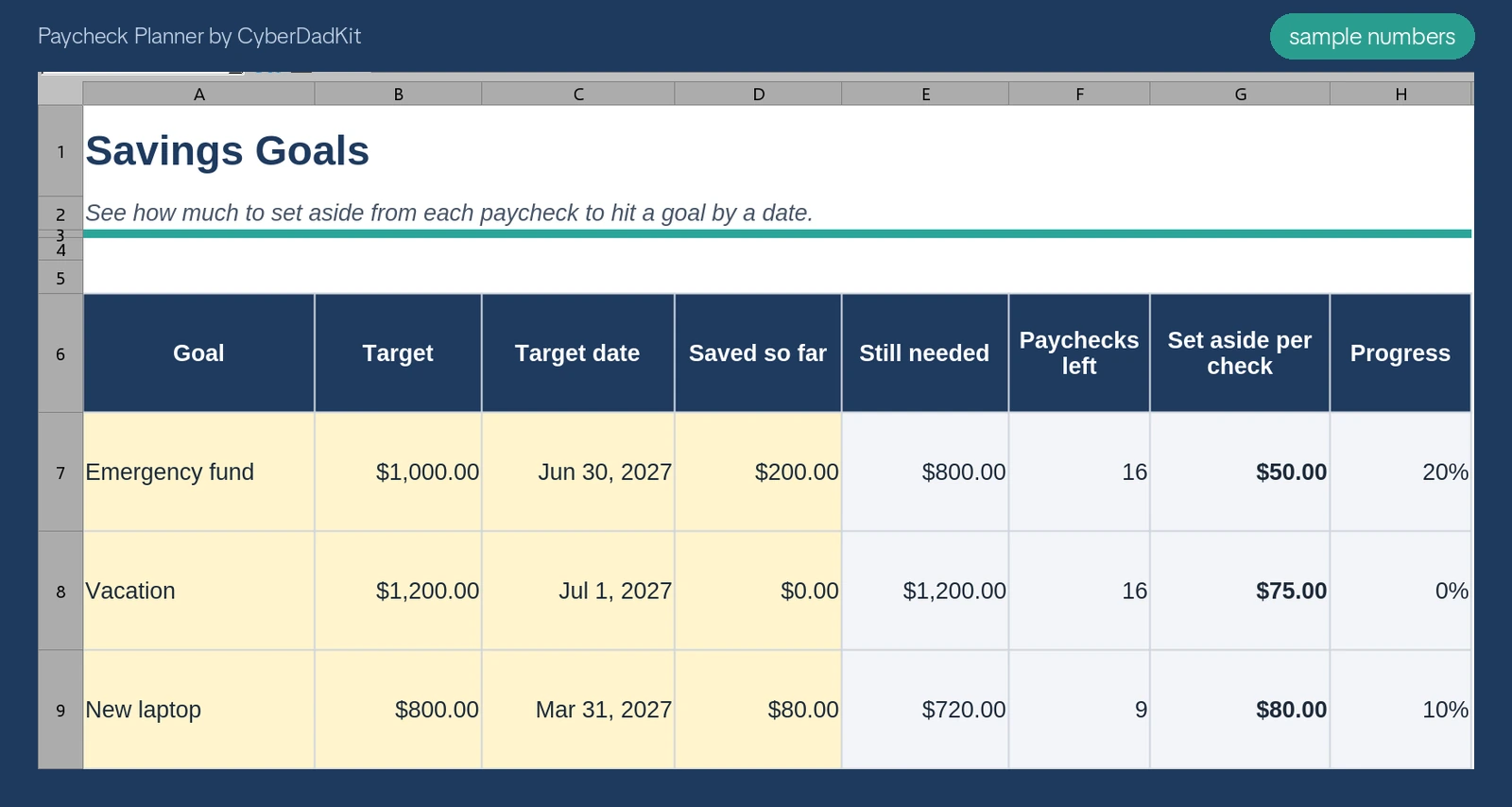
- Savings Goals: how much to save from each paycheck to hit each goal on time
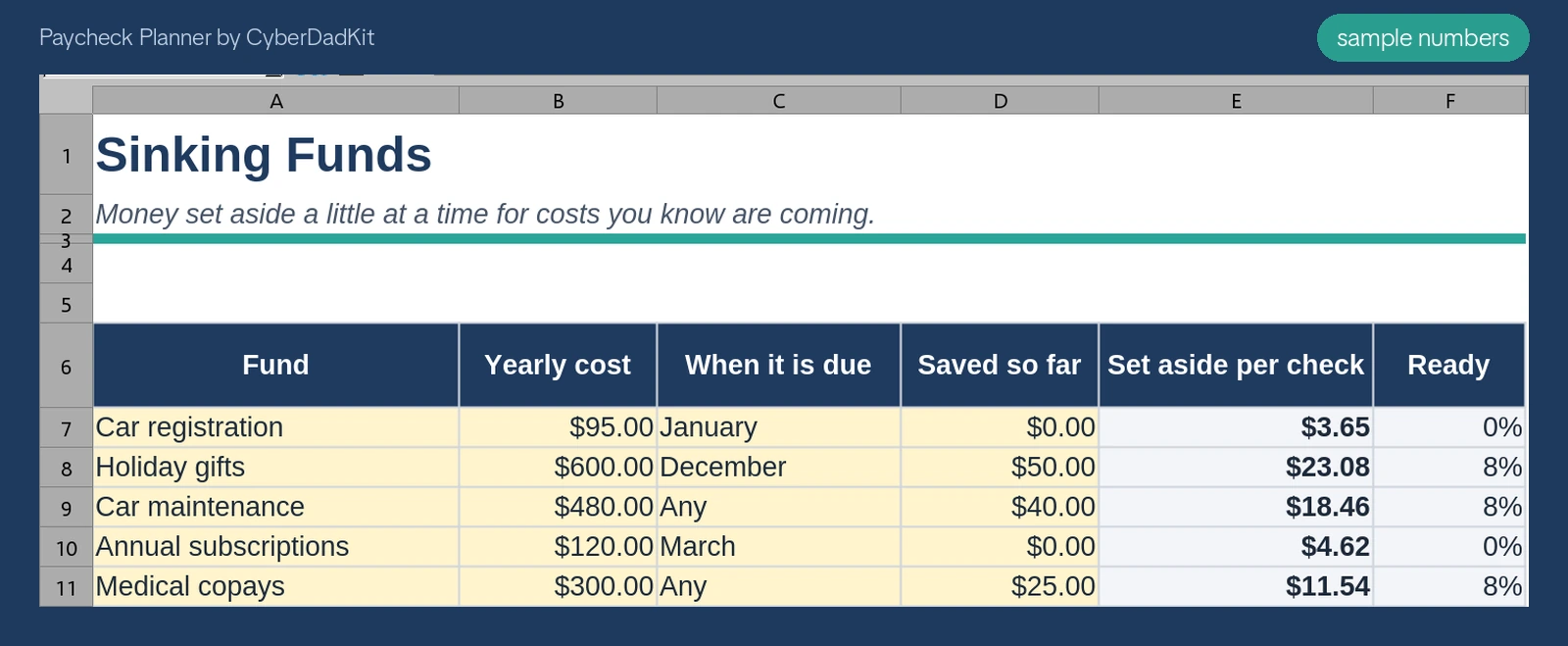
- Sinking Funds: set aside a little per check for costs you know are coming each year
- 2027 Overview: income, bills and left over for every month, including third-paycheck months
- The January Money Reset guide (PDF, 6 pages): a 7-day plan to start 2027 with every paycheck mapped
One-time USD price, US and Canada customers only. More about the Plus Bundle
Who it is for
- You get paid every 2 weeks, weekly, twice a month or monthly
- You know roughly what you make and what you owe, but not which check pays what
- You want a clear answer before you say yes to a purchase
- You would rather spend 10 minutes once than check the bank app every day
Not a fit if you want bank syncing or an app. This is a private spreadsheet. Your numbers stay in your own Google account or on your own computer.
Try it free for one month.
The Paycheck-to-Bills Mini Sheet maps up to 4 paychecks and 12 bills for one month, including bills due before your first check. See which paycheck pays which bill in about 3 minutes.
We'll email the sheet and occasional money planning tips. Unsubscribe anytime. US and Canada customers only.
FAQ
- Do I need Excel?
- No. Use the Google Sheets copy link (free Google account). The .xlsx should open in Excel 2016 or later. Both are included.
- Does it connect to my bank?
- No. Nothing is linked and no login is shared. You type your numbers, so they stay private.
- My pay changes every check. Will it work?
- Yes. Type the usual amount, then type the real amount on each check when you know it. Everything after updates.
- What if I get paid on a different day sometimes?
- Type the actual payday on that row. The plan moves the bills to match.
- Is this financial advice?
- No. It is a planning tool for your own numbers. It is not financial, tax or legal advice.
- How do I get it?
- Right after you pay, Stripe's hosted confirmation screen shows real links to your Google Sheets copy and the Excel (.xlsx) file. Plus Bundle purchases also include The January Money Reset PDF. Save those files now. If you need the links again, email ruel@getcyberdadkit.com with the email address you used at checkout.
- Who can buy it?
- It is available to customers located in the United States and Canada.
- Refunds?
-
Paycheck Planner is a digital product. You may request a full refund for any reason within 7 days of your purchase date. Email ruel@getcyberdadkit.com with the email address used for purchase and your order reference. Never send card details. Refunds are returned to the original payment method. No physical return is required. This policy applies only to Paycheck Planner and does not limit your statutory rights.
Paycheck Planner Plus Bundle is a digital product. You may request a full refund for any reason within 7 days of your purchase date. Email ruel@getcyberdadkit.com with the email address used for purchase and your order reference. Never send card details. Refunds are returned to the original payment method. No physical return is required. This policy applies only to Paycheck Planner Plus Bundle and does not limit your statutory rights.
See the refund policy.
- Questions?
- Visit getcyberdadkit.com.
For personal use only. Please do not resell, rehost or share the file.
Published by CyberDad Kit LLC, PO Box 940061, Maitland, FL 32794. Author: CyberDadKit. Not financial, tax or legal advice. Sample numbers are made up. Google Sheets is a trademark of Google LLC. Excel is a trademark of Microsoft Corporation. Not affiliated with either.
Guides for budgeting by paycheck
Short, practical walkthroughs that use clearly labeled sample numbers. Each one is a planning guide, not financial advice.
Not ready to buy?
You'll get a confirmation email first.